StravaforSim Racers.
Connect SimHub to save your lap times, sector splits, cars, and tracks in one driving record.
Works with every sim SimHub supports: ACC, iRacing, Automobilista, rFactor, and more.
Real laps,
real drivers.
Every number below is computed from the telemetry GTLane drivers and venues record, and refreshes a few times a day.
Live stats are unavailable right now. Try again in a few minutes.
Laps logged
—
Sessions
—
Drivers
—
Time on track
—
Distance driven
—
Fuel burned
—
Cars
—
Tracks
—
Most driven sims
- 1———
- 2———
- 3———
- 4———
- 5———
Most popular cars
- 1———
- 2———
- 3———
- 4———
- 5———
Most driven tracks
- 1———
- 2———
- 3———
- 4———
- 5———
For venues · Live views
One sim license.
Every customer named.
Run a single iRacing account across every rig in your venue, and your lobby screen still shows the real person in each seat. GTLane matches every rig to the customer booked on it, so the live dashboard reads "Ronny Vergara", not the same account name six times over. No other venue software does this.
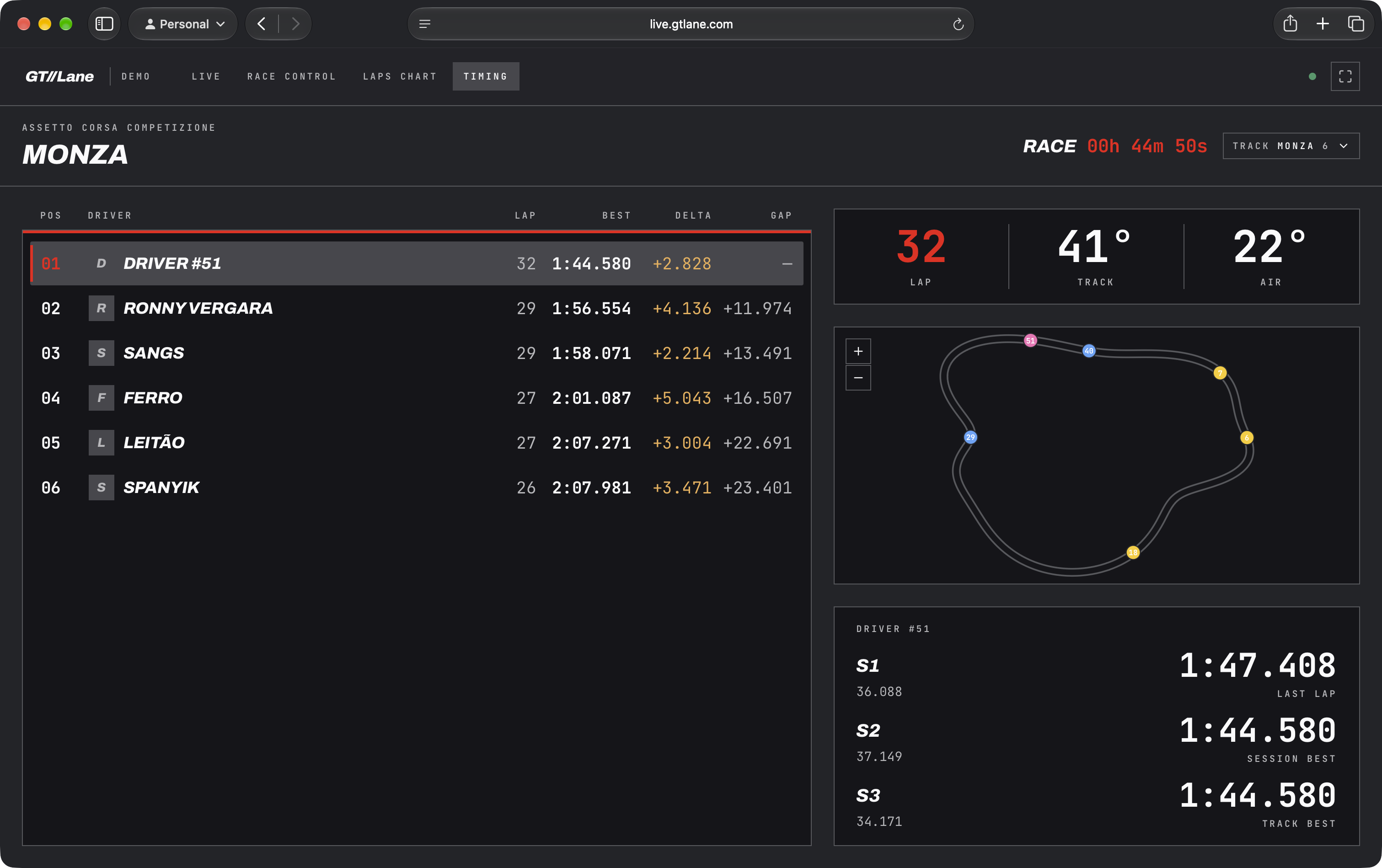
One license, many rigs
The sim sees the same account on every rig. GTLane knows which rig is which and who booked it, and puts the right name on the screen.
A TV wall for your venue
Put timing, race control, and the lap chart on the screens in your lobby. Friends waiting their turn watch the race, and walk-ins see why they should book.
Real names, real rivalry
Customers see their own name at the top of the board, not "Rig 5". That is what makes groups stay for another session and come back next week.
One API key.
That's it.
No new game integrations. No extra software running on your rig. If SimHub already reads your sim, GTLane can capture every lap.
Sign up and grab your API key
Create your free GTLane account in under a minute and copy the API key from your profile. That key is the only thing the SimHub plugin needs to start sending laps to your record.
Drop the plugin into SimHub
Add the GTLane plugin to SimHub on your rig and paste the API key. SimHub keeps doing what it already does. GTLane reads the same telemetry it is already collecting.
Drive, and your record builds itself
Hop in the sim. Every session, every lap, every sector lands on your GTLane profile in real time. Walk away from the rig and your full history is already there.
Personal driving history,
captured automatically.
SimHub sends your lap times, sector splits, and session details to your GTLane profile automatically.
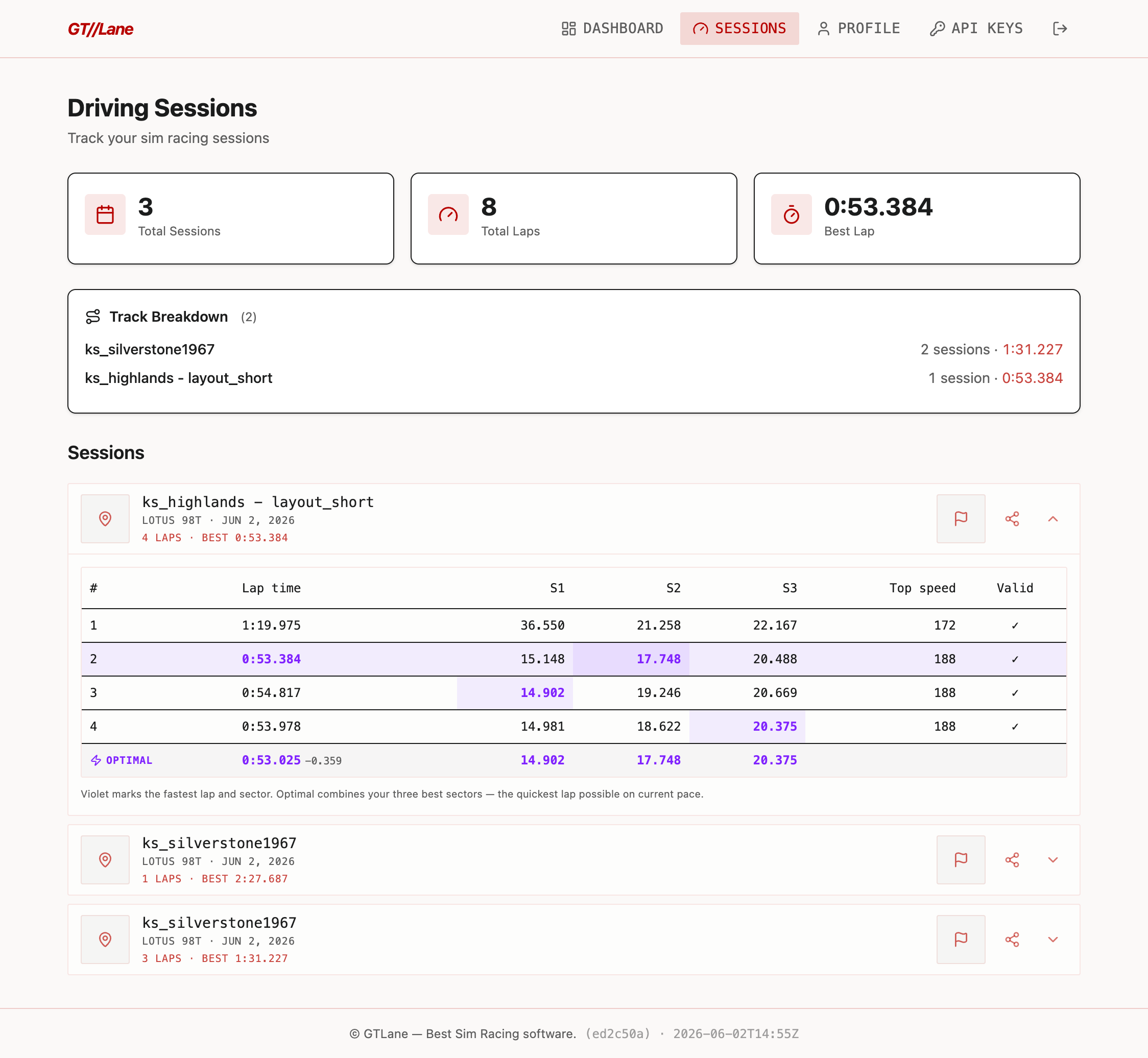
Every lap, every sector
Lap number, total lap time, and sector 1 / 2 / 3 splits stream in the moment you cross the line, plus a validity flag so cut laps stay out of your personal bests.
Track every car you drive
Car model, class, and ID stamped on every session. Switch from a GT3 to a Hypercar to a Group C and your record keeps each one separate, with PBs per car.
Review each track
Track name and configuration on every session. Build a real picture of which circuits you've put time into and where your fastest laps actually live.
Compare and improve
Look back at every lap you've set on the same car and track and see where the time went. Your own history is the benchmark: what you did last month vs. what you can do today.
Conditions in the data
Air temp, road temp, and rain density stamped on every session. A 1:42 in the dry and a 1:42 in the wet stop looking like the same lap.
Track your progress
Personal bests, session counts, total laps, and time on track, all building over weeks and months. See real progress instead of guessing whether you're getting faster.
Free to start.
Pro when you want depth.
Your whole driving record is free to use. Pro adds live coaching and deeper analysis as it lands.
Free
Your whole driving record
- Auto-capture every lap & sector
- Personal bests per car & track
- Lifetime stats & progress
- Public driver profile
- Social share cards
Pro · coming soon
Go deeper · get faster
- AI Race Engineer: live coaching
- Deep sector & optimal-lap analytics
- Unlimited history & comparisons
- Custom-branded share cards
- Early access: Teams & Leaderboards
Driver questions,
answered.
Can I use GTLane with Home Rig?
Which sims does this work with?
What data ends up on my profile?
Do I need a SimHub license?
What happens if my connection drops mid-session?
Can I see other drivers' times?
Start your
driving record.
Sign up, grab your API key, drop the plugin into SimHub, and your next stint is the first entry in a record that keeps building for as long as you keep driving.