
One API key.
Every lap on the record.
Point SimHub at GTLane and your driving record builds itself: lap times, sector splits, fuel burn, top and average speed, tire compound, plus the car, track, session type and weather it was driven in. No clipboards. No screenshots. No retyping times off the sim screen.
Works with every sim SimHub supports: ACC, iRacing, Automobilista, rFactor, and more.
Your lap times live
on the sim screen.
You put in a session, climb out, and everything you did stays trapped on the rig: best lap on the in-game leaderboard, sectors lost to a session reset, fuel and tires nowhere on paper. Next time you sit down, none of it is there.
The workarounds are worse. Phone photos of the timing screen. A spreadsheet you update for a week and then abandon. Half the data is missing and the other half is wrong by the time you write it down.
The GTLane SimHub plugin pulls every lap and every session straight from the telemetry your sim is already emitting. Your driving record, stats, and share cards all run off the same source of truth, captured automatically, with nothing for you to do.
What a manual workflow can't do
- Capture every lap time and sector split automatically
- Tag invalid laps so they stay out of personal bests
- Record fuel, top speed, average speed, and tire compound per lap
- Stamp each session with car, track, type, and weather context
- Put every stint on your profile in real time
From the telemetry bus
to your profile.
SimHub runs alongside your sim
Drop the GTLane plugin into SimHub on your rig. It listens to the same telemetry SimHub already reads from Assetto Corsa Competizione, iRacing, Automobilista, rFactor, and the rest. No extra game integration needed.
Session start fires once
On the first frame of every session GTLane captures the car, track, session type, lap total, and weather. The stint is anchored on your profile before the green light even drops.
Each lap streams to your profile
As laps complete, time, sectors, validity, fuel, speed, and tire compound stream up in real time. You watch your history grow live, and your stats update with every lap.
Plug it in,
start driving.
Seven small steps the first time. After that, every lap you drive streams to GTLane automatically.
- 01
Download the free plugin
Grab the GTLane plugin from our download page. No account or license key is needed for the download itself.
Download Plugin - 02
Move plugin to the SimHub folder
Copy the plugin into your SimHub install directory. SimHub auto-discovers plugins from this folder on next start.
C:\Program Files (x86)\SimHub
- 03
Restart SimHub
Close SimHub if it is running and start it again so it picks up the new plugin assembly.
- 04
Enable the plugin in SimHub
Open the SimHub plugin list and flip the GTLane toggle on. SimHub will load the plugin and show its panel on the next refresh.
- 05
Generate an API key on GTLane
Sign in to your free GTLane account, head to API keys in your profile, and create one. That key is the only thing the plugin needs to start sending your laps.
- 06
Paste the key into the plugin
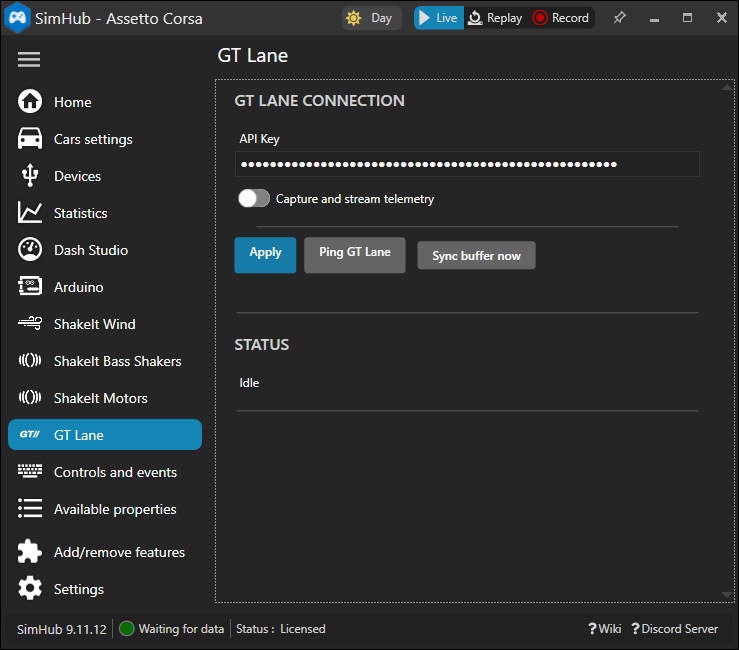
Open the GTLane panel inside SimHub and paste the API key into the field. The plugin stores it locally and reuses it across SimHub restarts.
- 07
Send a Ping to confirm
Click the Ping button in the plugin. If the response shows your account, the integration is live, and laps will stream from your next session.
That's it.
If the Ping response shows your account, the integration is live. Drive, and every lap, sector, fuel reading, top speed, and condition lands on your GTLane profile automatically.
Everything telemetry
captures for you.
Every lap, every sector
Lap number, total lap time, and sector 1 / 2 / 3 splits stream in from SimHub the moment you cross the line, plus a validity flag so cut laps are tagged and excluded from your personal bests automatically.
Fuel, speed, and tire compound
Fuel burn per lap, top speed, average speed, and the compound the lap was set on. The numbers you actually care about, captured per lap with no clipboard and no manual entry.
Session context, captured once
On the first frame of every session GTLane records the car model and class, the track, the session type, and total or remaining laps. You always know what you drove, where, and in what, independent of whether any lap was completed.
Weather in the data, not your memory
Air temp, road temp, and rain density are stamped onto the session at the start. A 1:42 in the dry and a 1:42 in the wet stop looking like the same lap.
Straight onto your profile
Every stint you drive, with laps, sectors, fuel, speed, tires, car, track, and conditions, lands on your GTLane profile in real time. Your full history builds itself across every session.
Powers your stats and share cards
The same telemetry feeds your lifetime stats and the share cards you post. Personal bests, optimal laps, and top speeds come from real lap data, not from a screenshot.
The full picture,
per lap and per session.
Two layers of data come off your rig: a one-shot session header the moment you load in, and a stream of lap records as each lap completes.
Per lap
- Lap number
- Lap time
- Sector 1 / 2 / 3 splits
- Valid / invalid flag
- Fuel used (litres)
- Top speed (km/h)
- Average speed (km/h)
- Tire compound
Per session
- Game title
- Car model, ID, and class
- Track name
- Session type
- Total / remaining laps
- Air and road temperature
- Rain density
Frequently asked questions
Which sims does the SimHub integration support?
What data is captured per lap?
What data is captured per session?
Do I need to own a sim racing venue to use this?
What happens if SimHub or the network drops mid-session?
Do I need a separate license for SimHub?
Go deeper
Product
Driving Record
Where the telemetry lands: every lap and session, personal bests per car and track, building automatically.
Product
Share Cards
Turn any captured session into a post-ready card for Instagram, TikTok and X.
Product
Driver Profile
The racing identity that fronts your record and your share cards.
Product
AI Race Engineer
Coming to Pro: live coaching built on the same telemetry stream.
Every stint,
on the record.
Sign up free, drop the plugin into SimHub, and your next session is the first entry in a driving record that keeps building.