Twelve people, four sims,
nobody left out.
A group booking has one name on it and a dozen people driving. GTLane now keeps a roster for the group, shows who is on each sim, rotates drivers fairly, and gives every lap to the person who drove it.
No signup required for the demo. Setup takes 2-5 business days.



The event day,
on one page.
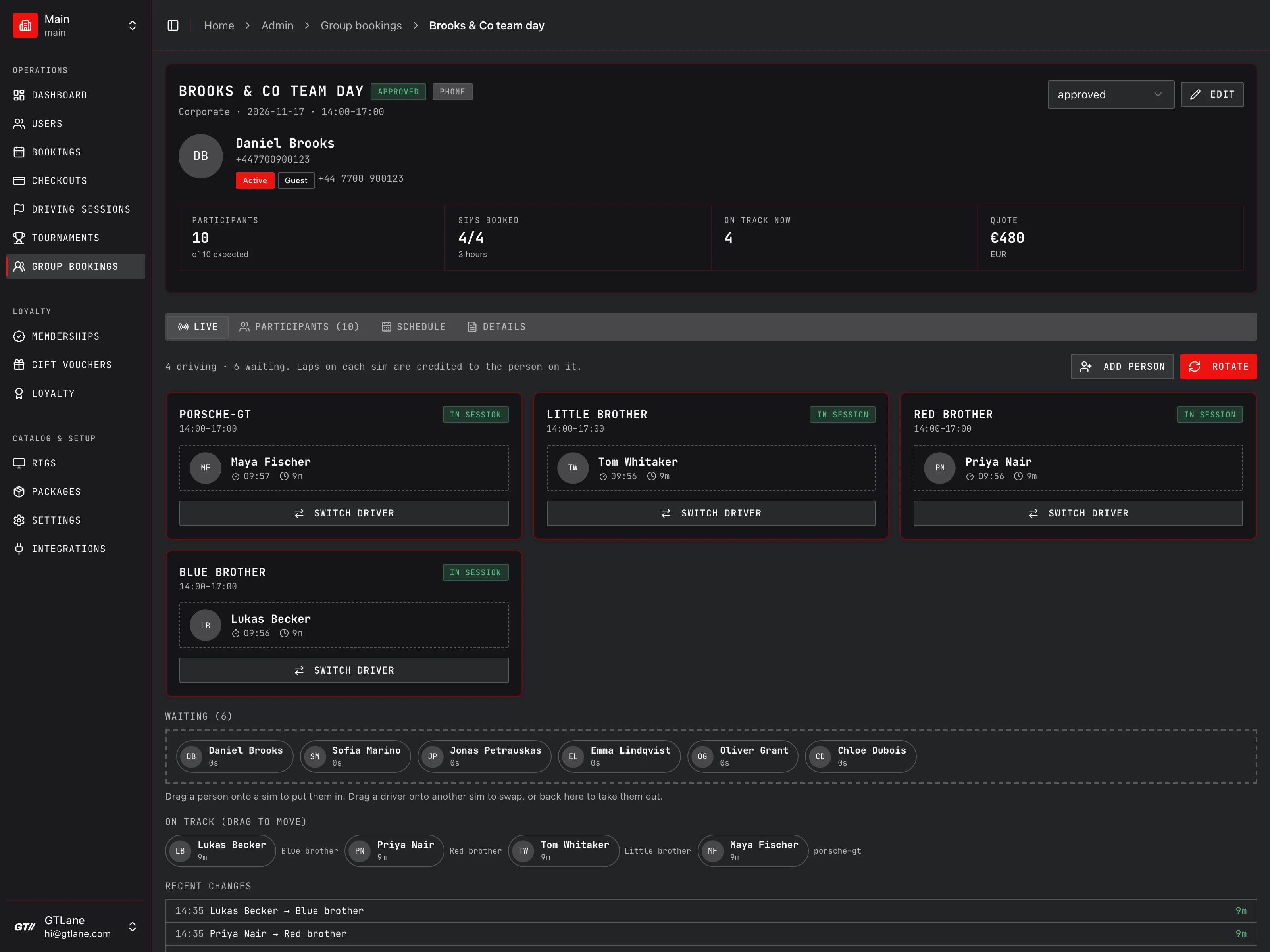
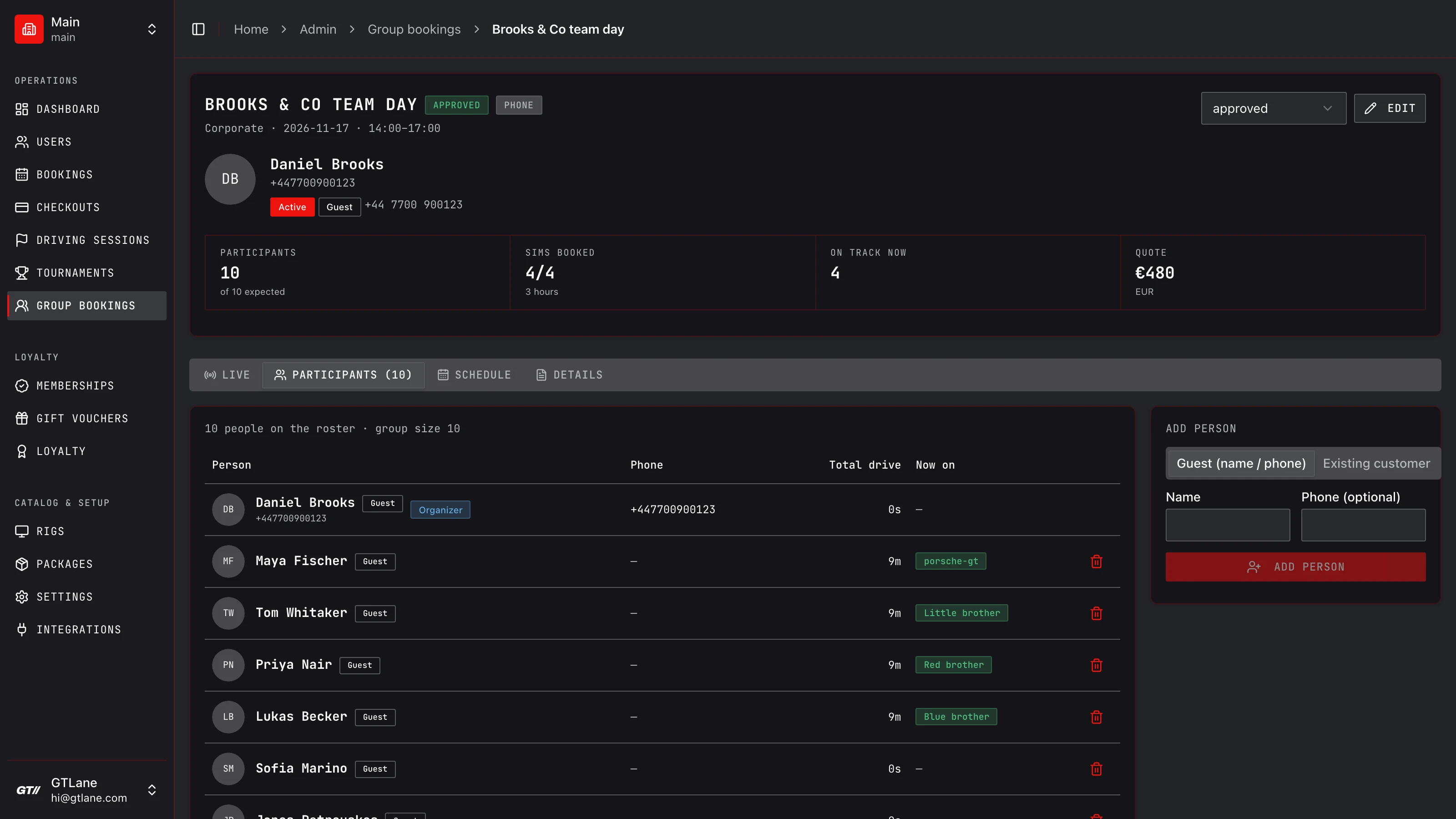
A ten-person team day on four sims, as staff see it in admin: who is driving, who is waiting, and how long each person has had.
One name on the booking,
twelve people in the room.
Booking software thinks in bookings, and a booking has one customer. So when a birthday party or a team day takes four sims, every one of them belongs to the person who made the call. The software has no idea who is actually in the seat.
On the day that turns into small, visible failures. The lounge TV shows the organizer's name on all four sims. Every lap of the afternoon lands on the organizer's profile, so the leaderboard is wrong and the fastest guest has nothing to show for it. Staff keep the rotation on a clipboard, and the quiet guest at the back gets ten minutes while someone else gets forty.
Group booking fixes the cause: the group gets its own roster, and staff seat people on sims as the event runs. Everything else reads from that seating, including drive time, the TV, the dashboard and the lap records.
What a clipboard can't do
- Tell you who has driven least without anyone counting
- Put the right name on the lounge TV when drivers change
- Credit a lap to the guest who set it
- Stay in sync between the floor and the front desk
- Stop a phone booking landing on a sim that is already taken
From the phone call
to the last stint.
Create the group booking
From an online inquiry or a phone call. Tick the sims to block them on the calendar, or tick none and save it as a quote to book later.
Add the people as they arrive
The organizer is on the list already. Add everyone else as an existing customer or as a name-only guest. No sign-up at the door.
Run the rotation from the Live tab
Drag people onto sims, swap them, or hit Rotate. Drive time, the lounge TV, the dashboard timeline and lap credit all follow the seating.
Still chasing the group before it books? The inquiry form and triage queue are covered onGroup & Corporate Events.
What staff get
on the event day.
Live board, one card per sim
On the event day the group page opens on the Live tab. Each sim shows who is driving, a timer for their current turn, and their total drive time so far.
Drag to seat, swap, or bench
Drag someone from the waiting area onto a sim to put them in. Drag a driver onto another sim to swap the two. Drag a driver back to the waiting area to take them out.
One-tap fair rotation
Rotate puts the people who have driven least onto the sims that have been occupied longest, then shows who moved where. Nobody has to keep count.
Laps go to whoever drove them
When someone is put on a group sim, SimHub's current driver and any new session on that sim are credited to them, not to the person who made the booking.
Book a group from a phone call
Pick an existing customer or add a guest by name and phone, enter the event, date, start time and hours, then tick the sims. Sims already booked at that time are marked.
Lounge TV shows the real driver
A sim with someone seated shows that person's name, avatar and driver number. An arriving group gets one welcome card listing its sims.
A seating board,
not a clipboard.
| Generic Booking Tools | Clipboard | GTLane | |
|---|---|---|---|
| See who is on which sim right now | Manual | ||
| Drive time per person | Manual | ||
| Fair rotation in one tap | |||
| Laps credited to the actual driver | |||
| Name-only guests, no account needed | Limited | Manual | |
| Lounge TV shows the seated driver | |||
| Phone booking that blocks the sims | Limited | Manual |
One hour of rental.
Per rig. Per month.
Whatever you charge for one hour on a sim is your monthly fee per rig. No upfront payment, no setup fees.
Your monthly bill
No upfront payment
Start today. We bill you next month.
No setup fees
Self-guided onboarding gets you live in 24h.
Cancel anytime
Month-to-month. No long contracts.
Frequently asked questions
What problem does group booking solve?
Do participants need a GTLane account?
How does Rotate decide who drives next?
Who gets the laps if nobody is assigned to a sim?
Can staff take a group booking over the phone?
Can several staff members run the same event?
What do other customers see about the people in a group?
How big can a group be?
Does it cost extra?
Run the next group event
without the clipboard.
Try the live demo to see the group page and its live board, or contact us to launch on your own branded gtlane.com subdomain in 2-5 business days.