Your home sim, every lap, on the record.
GTLane isn't just for venues. If you race from home and want a real history of every lap you've put in — across every car, every track, every session — point SimHub at GTLane and watch your driving record build itself.
Works with every sim SimHub supports — ACC, iRacing, Automobilista, rFactor, and more.
Your laps live
on the rig.
You finish a stint, the in-game leaderboard resets, and a personal best you set last Tuesday is gone. The car you drove for forty laps last month? You remember it was fast — you don't remember the lap time, the sectors, or the fuel run.
Spreadsheets and screenshots don't scale. Half the data goes missing, the other half is wrong by the time you write it down. There's no honest comparison between a 1:42 in the dry six months ago and a 1:42 in the rain today.
GTLane gives you one place where every lap you drive — at home, on your own rig — lands automatically. Sectors, fuel, top speed, tire compound, plus the car, track, and weather. Your full driving history, captured the moment it happens.
Without GTLane
- In-game leaderboards reset between sessions
- No history of which cars or tracks you've actually driven
- No honest comparison across weather and conditions
- Personal bests live on a screenshot folder, not a record
- No way to know if you're actually getting faster
Personal driving history,
captured automatically.
Everything SimHub already sees from your sim — laps, sectors, conditions, car, track — flows into your GTLane profile. No clipboards, no screenshots, no manual entry.
Every lap, every sector
Lap number, total lap time, and sector 1 / 2 / 3 splits stream in the moment you cross the line — plus a validity flag so cut laps stay out of your personal bests.
Track every car you drive
Car model, class, and ID stamped on every session. Switch from a GT3 to a Hypercar to a Group C and your record keeps each one separate — with PBs per car.
Track every track you drive
Track name and configuration on every session. Build a real picture of which circuits you've put time into and where your fastest laps actually live.
Compare and improve
Look back at every lap you've set on the same car and track and see where the time went. Use your own history as a benchmark — what you did last month vs. what you can do today.
Conditions in the data
Air temp, road temp, and rain density stamped on every session. A 1:42 in the dry and a 1:42 in the wet stop looking like the same lap.
Track your progress
Personal bests, session counts, total laps, and time on track — all building over weeks and months. See real progress instead of guessing whether you're getting faster.
One API key.
That's it.
No new game integrations. No extra software running on your rig. If SimHub already reads your sim, GTLane can capture every lap.
Sign up and grab your API key
Create your free GTLane account in under a minute and copy the API key from your profile. That key is the only thing the SimHub plugin needs to start sending laps to your record.
Drop the plugin into SimHub
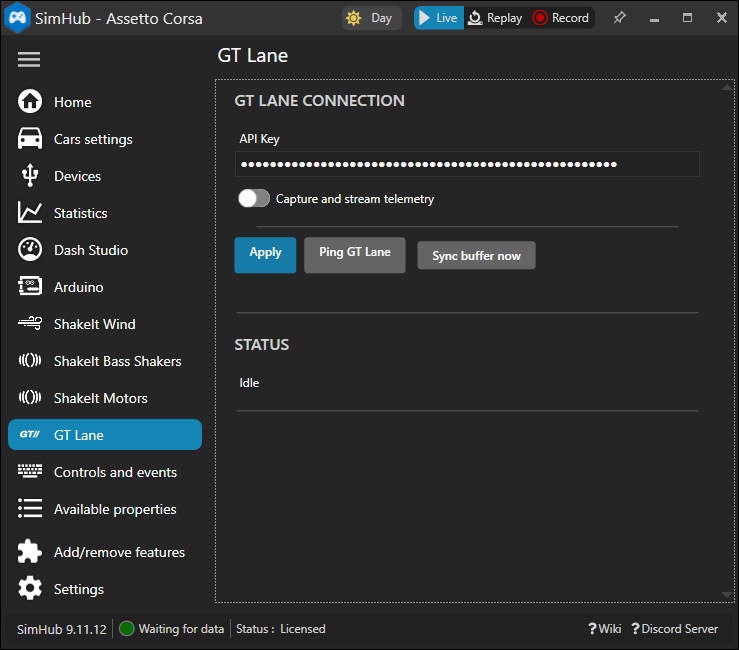
Add the GTLane plugin to SimHub on your rig and paste the API key. SimHub keeps doing what it already does — GTLane just reads the same telemetry it's already collecting.
Drive — your record builds itself
Hop in the sim. Every session, every lap, every sector lands on your GTLane profile in real time. Walk away from the rig and your full history is already there.
Driver questions,
answered.
Do I need to own a sim racing venue to use GTLane?
Which sims does this work with?
What data ends up on my profile?
Do I need a SimHub license?
What happens if my connection drops mid-session?
Can I see other drivers' times?
Start your
driving record.
Sign up, grab your API key, drop the plugin into SimHub, and your next stint is the first entry in a record that keeps building for as long as you keep driving.