A lounge TV display
that runs itself.
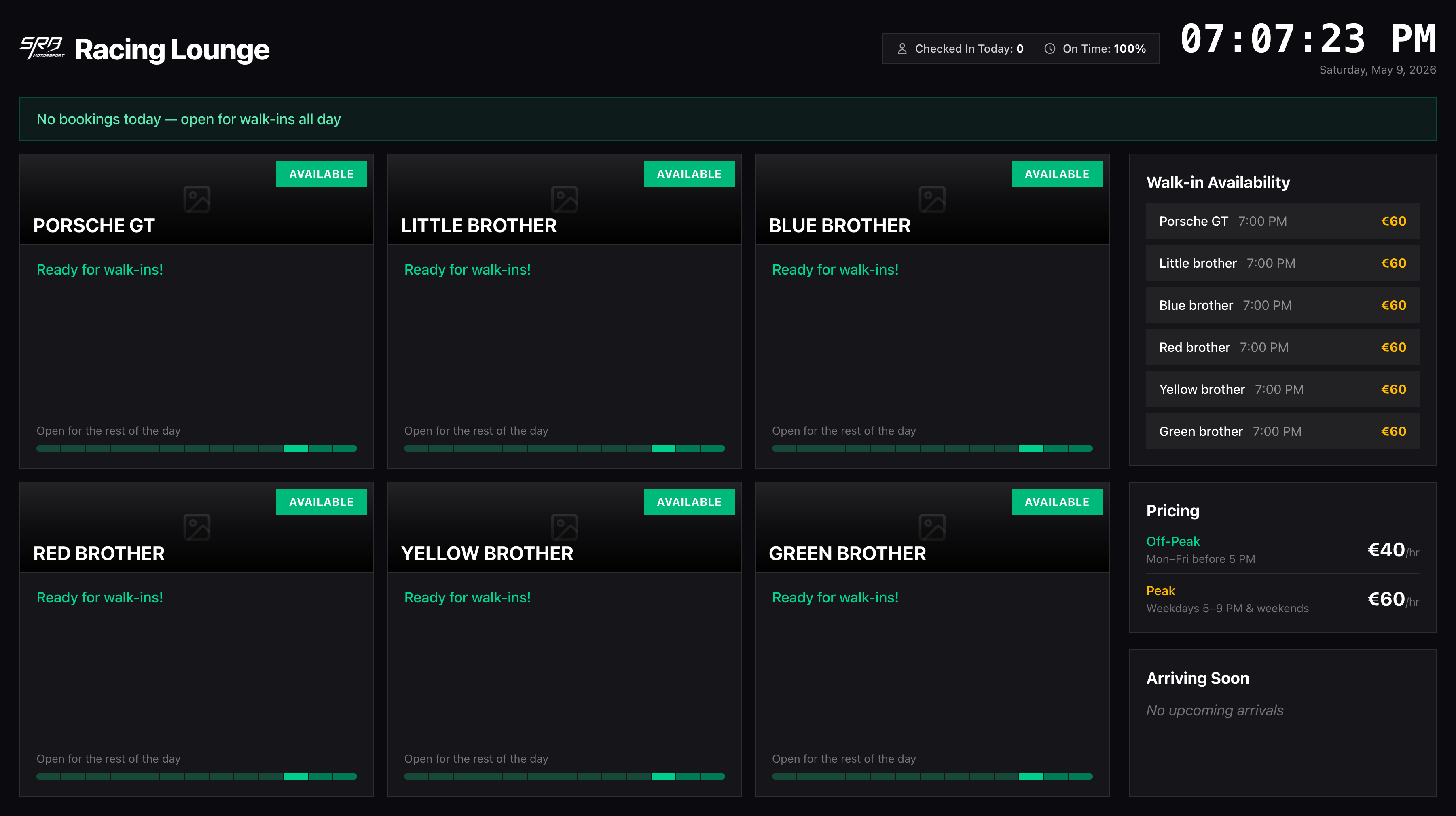
Live bay status with countdowns, QR self check-in for arriving members, walk-in slots, and peak / off-peak pricing — all on a single screen, all from your live booking data. Open it on any TV with a browser and walk away.
No signup required for the demo. Included on the Professional plan and above.
What members see
in the lounge.
Plug a screen into any device. Live bay status, walk-in availability, peak / off-peak pricing — branded, real-time, zero setup.
A blank TV in your lounge
is missed revenue.
Members waiting for a friend, walk-ins sizing up the place, parents watching kids race — every one of them is looking at a screen. If that screen shows nothing useful, you're paying for hardware that does nothing for your business.
The other extreme — generic digital signage — needs someone to update slides, swap pricing, and remember to switch the playlist. It rots within a week.
The GTLane lounge TV display is wired directly into your bookings. Bay status, countdowns, walk-in slots, pricing, and arriving members all update themselves. Open it once. Forget about it.
What a static display can't do
- Show how long until the next bay opens up
- Promote a walk-in slot that just freed up because of a cancellation
- Let an arriving member check themselves in by scanning a QR
- Update peak / off-peak pricing automatically as the day shifts
- Welcome a member by name when they walk in
Three steps from box
to live screen.
Open the TV URL on any screen
Smart TV, Chromecast, Apple TV, mini-PC — anything with a browser. Open the dashboard URL in fullscreen and walk away.
Bookings appear automatically
The screen pulls live data from your booking engine. No exports, no manual updates. Everything renders in your locale, timezone, and currency.
Members self-check-in by QR
Arriving members scan the QR next to their booking. Bay status flips, the stats bar pulses, the next-up driver is announced. Staff stay focused on the experience.
Six panels, one screen,
zero staff effort.
Live rig status grid
Every simulator bay on screen with a colour-coded status — Available, Occupied, or Next Up — and a live countdown for whoever is racing right now.
QR self check-in
Each upcoming booking displays a unique QR code. Members scan with their phone, get checked in, and the bay flips status without staff lifting a finger.
Walk-in slot board
A live list of the next available slots — rig, time, and price — so walk-ins know exactly what to ask for at the desk.
Peak vs off-peak pricing
Your hourly rates displayed in your currency. Off-peak in green, peak in amber. No more "what does it cost right now?" questions.
Welcome board for arriving members
Personal welcome by name with the rig and time they're booked. Auto-rotates when more than three people are arriving in the next window.
Check-in stats bar
Running total of check-ins today and on-time percentage. The bar pulses amber the moment someone scans a QR — staff and members notice.
GTLane vs the alternatives,
side by side.
| Static Digital Signage | Whiteboard / Paper | GTLane TV | |
|---|---|---|---|
| Live bay availability | Manual | ||
| Live countdown for occupied bays | |||
| QR check-in for arriving members | |||
| Real-time pricing display | Manual | Manual | |
| Auto-updates without staff effort | |||
| Localized currency, timezone, language |
One hour of rental.
Per rig. Per month.
Whatever you charge for one hour on a sim — that's your monthly fee per rig. No upfront payment. No setup fees. The math couldn't be simpler.
Your monthly bill — calculator
No upfront payment
Start today. We bill you next month.
No setup fees
Self-guided onboarding gets you live in 24h.
Cancel anytime
Month-to-month. No long contracts.
Frequently asked questions
What hardware do I need to run the lounge TV display?
Does the TV need an internet connection?
How does the QR check-in actually work?
How many simulator bays does the display fit?
Is the TV display included in every plan?
Does it support different time zones, currencies, and languages?
What does the screen show when there are no bookings?
Go deeper
Feature
Sim Racing Booking Software
The booking engine that feeds the TV — real-time bay availability, member self-service, and waitlists.
Feature
Automated Driver Check-in
The QR arrival flow behind the welcome board — bays flip status on the screen the moment a driver scans in.
Feature
Self-Service Kiosk
The tablet-by-the-door companion to the lounge TV — walk-ins pick a slot, pay, and start a session unassisted.
Feature
Race Control Software
One-click session control across every sim — the live status and results that the TV display renders.
Feature
Leaderboard Software
Live track and car records that loop on the lounge screen — turn the TV into a hot-lap chase.
How-to
Reducing No-Shows in Sim Racing Lounges
QR check-in is one tactic. Reminders, waitlists, and policies are the others.
Operations
Sim Racing Lounge Operations Checklist
What to set up, automate, and watch — daily, weekly, and monthly.
All features
Every GTLane feature
Bookings, memberships, loyalty, lounge TV, analytics, multi-site — all the modules in one place.
Turn your lounge TV
into your best salesperson.
See the live demo or contact us to launch on your own branded gtlane.com subdomain in 2-5 business days.